→ GitHub: Ily455/attack-detect-lab
Personal lab project, 2026. Adversary technique simulation using Atomic Red Team against a Linux VM, detected with Elastic SIEM — 6 MITRE ATT&CK techniques, real auditd log evidence, and Kibana detection rules.
Architecture
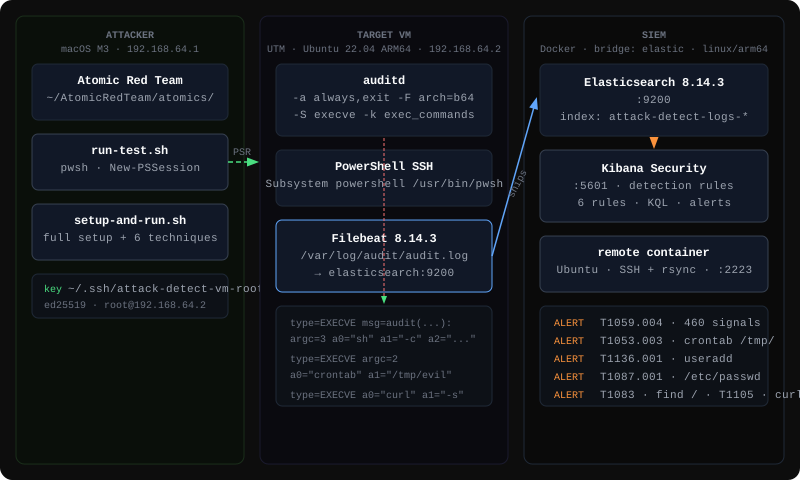
The Mac acts as the attacker — it runs Atomic Red Team and sends commands to the VM via PowerShell SSH remoting (PSRemoting). The VM is the victim — it executes the techniques, records every execve syscall via auditd, and ships logs to the SIEM via Filebeat. The SIEM (Elasticsearch + Kibana) runs in Docker and never touches the target.
Stack
| Component | Role | Version |
|---|---|---|
| Elasticsearch | Log storage and indexing | 8.14.3 |
| Kibana | SIEM UI, detection rules, KQL | 8.14.3 |
| Filebeat | Log shipper (runs on target VM) | 8.14.3 |
| Target VM | Ubuntu 22.04 ARM64 — attack surface | UTM on M3 |
| Atomic Red Team | MITRE ATT&CK technique simulator | latest |
| PowerShell | PSRemoting transport + Atomic runtime | 7.4.6 |
Elastic images run as linux/arm64 — no emulation.
Detection Pipeline
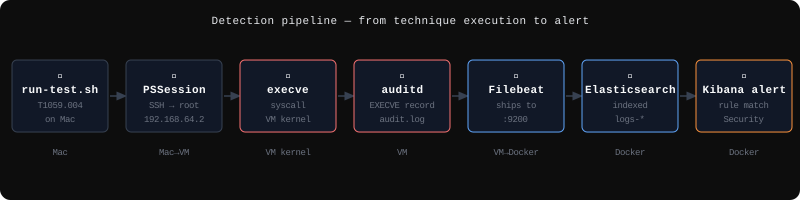
How a Test Run Works
| |
pwshopens a PSSession (SSH transport) to the VM as rootInvoke-AtomicTest T1059.004 -Session $sruns on the Mac, commands execute on the VM- The VM kernel intercepts every
execvesyscall — auditd writes a structuredEXECVErecord - Filebeat reads
/var/log/audit/audit.logand ships events to Elasticsearch within seconds - Kibana detection rules evaluate incoming events — matching events generate alerts in Security
Invoke-AtomicTest -Cleanupremoves artifacts from the VM
Techniques
| # | ID | Name | Tests | Tactic |
|---|---|---|---|---|
| 1 | T1059.004 | Unix Shell | 15/17 | Execution |
| 2 | T1053.003 | Cron Job Persistence | 4/4 | Persistence |
| 3 | T1136.001 | Create Local Account | 2/5 | Persistence |
| 4 | T1087.001 | Local Account Discovery | 4/4 | Discovery |
| 5 | T1083 | File and Directory Discovery | 3/3 | Discovery |
| 6 | T1105 | Ingress Tool Transfer | 7/9 | Command & Control |
T1059.004 — Unix Shell
15/17 sub-tests executed successfully. auditd captured every shell invocation via execve. Sample evidence:
type=EXECVE msg=audit(1780489845.066:1912): argc=3 a0="sh" a1="-c" a2=""
KQL: message: "type=EXECVE" AND (message: "a0=\"sh\"" OR message: "a0=\"bash\"" OR message: "a0=\"dash\"")
T1053.003 — Cron Job Persistence
4/4 sub-tests executed successfully. Key evidence — crontab loaded from /tmp/, which legitimate cron management never does:
type=EXECVE argc=2 a0="crontab" a1="/tmp/persistevil"
KQL: message: "type=EXECVE" AND message: "a0=\"crontab\""
T1136.001 — Create Local Account
2/5 Linux-relevant tests passed (FreeBSD and kubectl tests excluded). Includes creation of a UID=0 account — a second root. auid=1000 persists across sudo, tracking the original user even when commands run as root.
type=PROCTITLE proctitle=7573657264656C006576696C5F75736572 → userdel evil_user
KQL: message: "type=EXECVE" AND (message: "a0=\"useradd\"" OR message: "a0=\"adduser\"")
T1087.001 — Local Account Discovery
4/4 tests passed. Commands: cat /etc/passwd, cat /etc/shadow, lsof, getent passwd. auditd captured every invocation.
type=EXECVE argc=2 a0="cat" a1="/etc/passwd"
type=EXECVE argc=1 a0="lsof"
KQL: message: "type=EXECVE" AND (message: "a1=\"/etc/passwd\"" OR message: "a1=\"/etc/shadow\"" OR message: "a0=\"lsof\"")
T1083 — File and Directory Discovery
3/3 tests passed. Commands: find /, directory tree enumeration, showmount for network share discovery.
type=EXECVE argc=2 a0="find" a1="/"
type=EXECVE argc=1 a0="showmount"
KQL: message: "type=EXECVE" AND (message: "a0=\"find\"" OR message: "a0=\"showmount\"" OR message: "a0=\"tree\"")
T1105 — Ingress Tool Transfer
7/9 tests passed. A dedicated remote container (Ubuntu + SSH + rsync) was added as a staging server. rsync push/pull, scp push/pull, sftp push/pull, and curl download+execute all passed.
type=EXECVE a0="curl" a1="-s" a2="<url>"
KQL: message: "type=EXECVE" AND (message: "a0=\"curl\"" OR message: "a0=\"wget\"" OR message: "a0=\"rsync\"" OR message: "a0=\"scp\"")
Engineering Constraints Found During Build
The first version of this lab used a Docker container as the target. This uncovered several constraints worth documenting.
Docker Desktop’s linuxkit kernel has no audit subsystem. The audit framework (auditd, CAP_AUDIT_*) is not compiled into the kernel Docker Desktop ships. auditctl -s returns “Operation not permitted” regardless of capabilities granted. There is no workaround short of replacing the kernel.
PowerShell script block logging on Linux requires systemd/journald. Enabling ScriptBlockLogging in powershell.config.json silently does nothing in a minimal container — there is no journald to write to.
Consequence: A container target can only capture what it deliberately writes to known log files. It cannot passively record what commands ran. That is not real SIEM monitoring.
Solution: Move the target to a proper Linux VM (UTM, Ubuntu 22.04). Two audit rules capture every execve call on the system:
| |
ARM64 note: Microsoft’s Linux package repository does not publish PowerShell for ARM64. Installation requires the tarball from GitHub releases directly.