Group project — FSI M2, Sécurité des systèmes d’informations module, AMU 2023–2024. Goal: simulate a complete virtualized enterprise network on VMware ESXi, covering hypervisor setup, VM deployment from master images, network services configuration, and supervision.
Overview
The project involved designing and deploying a full virtualized enterprise network from scratch on VMware ESXi 6.5. Every component — router, DNS, DHCP, web server, supervision post, admin post, and user workstations — runs as a VM on the same ESXi host, managed through the ESXi Host Client web interface.
The deployment approach is based on master VMs: a Windows Server master and an Ubuntu master are configured once, then cloned to spin up new instances without reinstalling from scratch each time.
Infrastructure
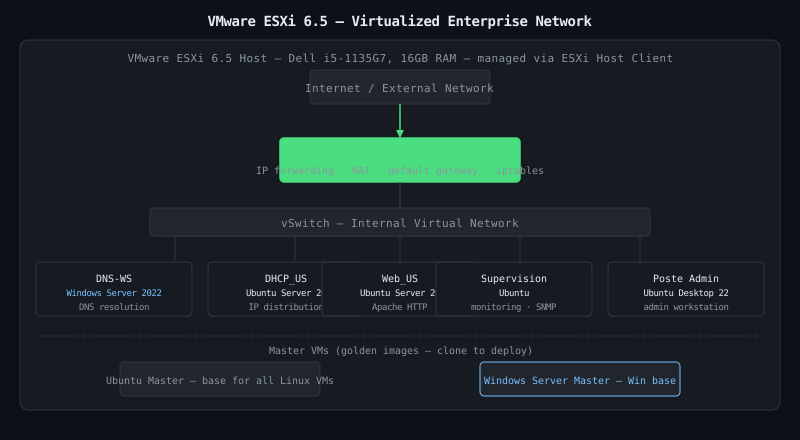
Hypervisor: VMware ESXi 6.5, managed via the ESXi Host Client.
| VM | OS | Role |
|---|---|---|
| Ubuntu Master | Ubuntu | Base image for Ubuntu instances |
| Windows Server Master | Windows Server 2022 | Base image for Windows instances |
| Routeur_US | Ubuntu Server 20 | Network router / gateway |
| DNS-WS | Windows Server 2022 | DNS server |
| DHCP_US | Ubuntu Server 20 | DHCP server |
| Web_US | Ubuntu Server 20 | Web server (Apache) |
| Poste supervision | Ubuntu | Supervision / monitoring post |
| Poste admin | Ubuntu Desktop 22.0 | Administration workstation |
| Poste utilisateur | Windows 10 | User workstation |
Masters and VM Deployment
Before deploying services, two master VMs were built — one Windows Server 2022, one Ubuntu. Each is a fully installed and configured OS image that can be cloned to deploy any new instance quickly. Every service VM is created from the appropriate master, then configured for its specific role.
This mirrors production practice: a golden image that’s been tested and validated, cloned per need rather than reinstalled each time.
Network Services
Router — Ubuntu Server 20
The router VM runs Ubuntu Server with IP forwarding enabled, configured to route traffic between network segments. It acts as the default gateway for other VMs.
DNS — Windows Server 2022
DNS deployed on Windows Server 2022. Resolves internal hostnames so VMs can reference each other by name rather than IP — required for the web server and admin workflows.
DHCP — Ubuntu Server 20
DHCP server on Ubuntu Server 20, distributing IP configurations to workstations automatically.
Web Server — Ubuntu Server 20 (Apache)
Apache deployed on Ubuntu Server 20. Used to verify end-to-end connectivity across the network and simulate a production web service reachable from user workstations.
Supervision and Administration
Supervision post
A dedicated VM for monitoring — tracking the health and metrics of deployed services across the infrastructure.
Admin post — Ubuntu Desktop 22.0
A dedicated Ubuntu Desktop 22.0 workstation for managing the infrastructure: configuring services, accessing the ESXi Host Client, and performing administrative tasks centrally.
What I Learned
Virtualization:
- The master VM approach is operationally sound — a golden image configured once, cloned per need. Rebuilding from scratch each time doesn’t scale
- ESXi Host Client gives a unified view of all VMs, their resource usage, and their state — useful for debugging when something silently fails
- AMD Ryzen hardware requires ESXi 6.5 specifically (not the latest); hardware compatibility matters before choosing a hypervisor version
Networking:
- Configuring Ubuntu Server as a router (IP forwarding + manual routing rules) makes the mechanics of routing tangible in a way that a dedicated appliance does not
- DNS is foundational — without it, every other service has to be addressed by IP, which breaks the moment any address changes
- Testing each layer independently (router → DNS → DHCP → web) before integration makes debugging the full stack much faster
Group work:
- The mode opératoire format — step-by-step, illustrated, with expected results per action — is the right documentation approach for reproducible infrastructure deployment
- Parallel work on different components requires explicit coordination on IP addressing and naming conventions before anyone starts configuring