Academic project — SICS engineering degree, spring 2023. Goal: learn and practice automated fuzzing on Android. Target:
.dexfiles processed bydexdump. Framework: Droid-FF with Radamsa as mutation engine.
Setup
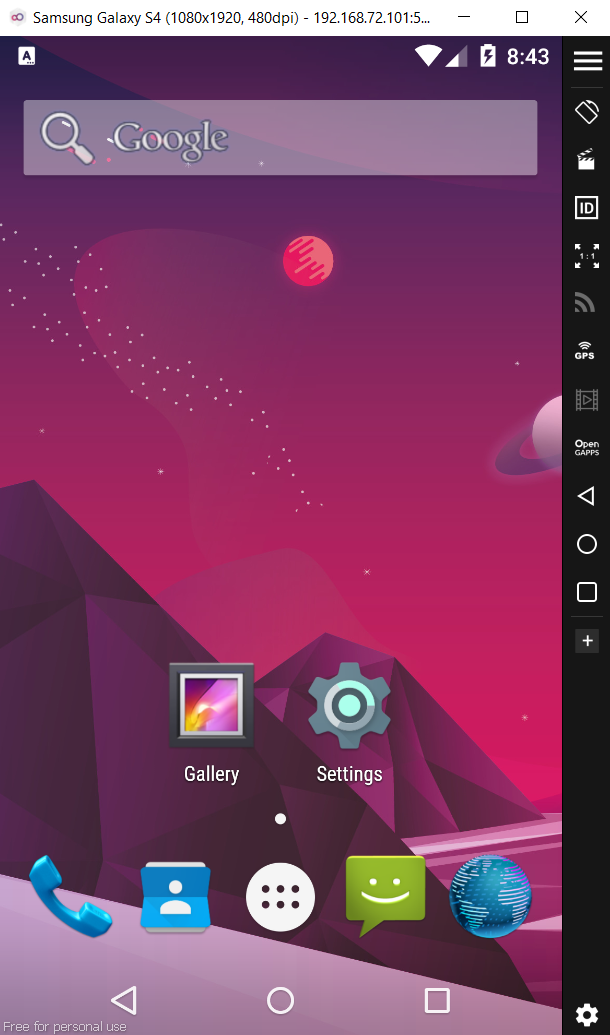
Host: Kali Linux Emulator: Genymotion (Samsung Galaxy S4 image — 192.168.1.114:5555) Fuzzing framework: Droid-FF Mutation engine: Radamsa Connection: ADB over TCP
The emulator was registered with Droid-FF via adb connect 192.168.1.114:5555. All file transfer and crash collection goes through ADB.
Why .dex files
The target for this campaign is .dex files processed by dexdump — not multimedia files or the media stack. dexdump is a system binary that parses a structured binary format (Dalvik Executable), processes it into memory, and uses system libraries (including libz.so for decompression). It is a standalone target reachable with a single adb shell command — no intent system, no sandbox, no HAL.
This is different from approaches targeting mediaserver or stagefright, which require triggering media parsing through Android’s IPC layer and add several failure points.
Workflow
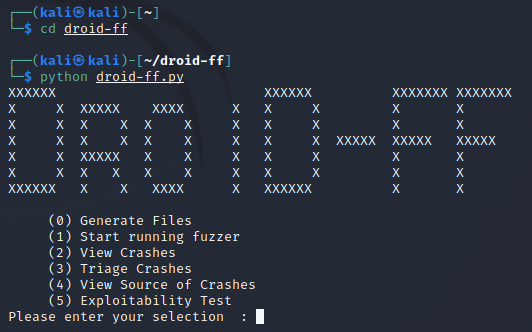
Droid-FF exposes a five-step menu:
(0) Generate Files         — mutate a seed file into N samples
(1) Start running fuzzer   — push samples, run target, log crashes
(2) View Crashes           — pull logcat, identify crashing inputs
(3) Triage Crashes         — confirm reproduction, collect tombstones
(4) View Source of Crashes — symbolize crash addresses
(5) Exploitability Test
Step 0 — Generate files
Selected Radamsa as the mutation engine with a seed .dex file. Generated 50 samples.
Step 1 — Run the fuzzer
For each sample, Droid-FF:
- Runs
dexRepairon the sample to ensure it is accepted as a valid.dexby the target - Pushes the
.dexto/data/local/tmpviaadb push - Runs
adb shell /system/xbin/dexdump /data/local/tmp/sampleN.dex - Logs SIGSEGV crashes from logcat
- Deletes the tested file from the device
Note on dexRepair: before fuzzing, Droid-FF repairs structural fields in the .dex header (checksums, offsets) so the file passes initial validation and reaches the deeper parsing code. Without this step, most mutated .dex files would be rejected at the header check before reaching libz.so decompression.
Step 2 — View crashes
Pulled logcat output: 1375 lines total. Multiple .dex files triggered SIGSEGV in dexdump.
Logcat output is noisy — system processes crash independently of fuzzing, and all crash signals share the same stream. Droid-FF handles this by logging a marker before each test input, allowing crash-to-input correlation without manual inspection.
Step 3 — Triage crashes
For each crashing input, Droid-FF:
- Clears
/data/tombstones/* - Re-pushes the file and re-runs dexdump
- Confirms the crash reproduces
- Pulls the tombstone to
fuzzer/confirmed_crashes/
The tombstone (/data/tombstones/tombstone_00) is Android’s crash dump. It contains signal and fault address, register state at crash time, full backtrace with PC values per frame, and open file descriptors and memory map.
Example — sample27.dex:
adb push .../sample27.dex /data/local/tmp        → 0.9 MB/s, 553109 bytes
adb shell /system/xbin/dexdump /data/local/tmp/sample27.dex
→ tombstone_00 created (10447 bytes, 2023-01-11 20:57)
adb pull /data/tombstones/tombstone_00 .../confirmed_crashes/tombstone_sample27.dex
→ 7.9 MB/s, 10447 bytes

Step 4 — Symbolize the crash
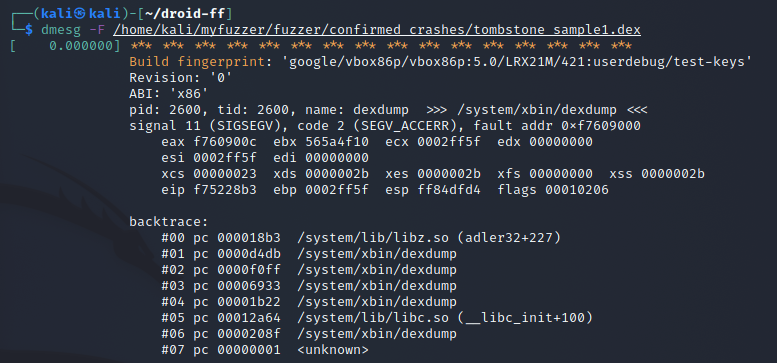
Option 4 itself errored. Used dmesg to read the tombstone kernel buffer:
signal 11 (SIGSEGV), code 2 (SEGV_ACCERR), fault addr 0xf7609000
pid: 2600, tid: 2600, name: dexdump  >>> /system/xbin/dexdump <<<
ABI: 'x86'

eax f7609000  ebx 565a4f10  ecx 0002ff5f  edx 00000000
 esi 00000023  edi 00000000

backtrace:
  #00 pc 000018b3  /system/lib/libz.so (adler32+227)
  #01 pc 0000d4db  /system/xbin/dexdump
  #02 pc 0000f0ff  /system/xbin/dexdump
  #03 pc 00006922  /system/xbin/dexdump
  #04 pc 00001b22  /system/xbin/dexdump
  #05 pc 00012a64  /system/lib/libc.so (__libc_init+100)
Pulled libz.so from the device and ran addr2line:
| |
What the crash path tells us
SEGV_ACCERR (code 2) means “address present in memory but wrong permissions” — distinct from SEGV_MAPERR (address not mapped at all). This suggests a pointer corruption or buffer overflow that hit a protected region rather than unmapped space.
The backtrace places the fault in libz.so at adler32+227. The call chain: dexdump → libz.so → adler32+227.
adler32 is a checksum function used by zlib during decompression. A .dex file mutated by Radamsa may have corrupted its internal structure in a way that makes dexdump attempt to decompress a data section with invalid parameters. A mutation that corrupts length or offset fields in the .dex compressed section header could lead adler32 to operate on an out-of-bounds buffer.
The function is identified but source line returns ??:? — the device’s libz.so is stripped. Line-level resolution would require a debug build of AOSP matching the device image.
This is a crash — not a confirmed exploitable vulnerability. The SIGSEGV doesn’t tell you whether the input controls eip. That’s what Option 5 (Exploitability Test via gdb/gdbserver) addresses — it was not run in this project.
Limitations
Emulator vs real hardware: Genymotion uses x86 hardware virtualization. Real Android devices run ARM. Fault address and register state differ between platforms; a crash on the emulator does not guarantee the same crash on hardware.
Android 5.0: the target was Android 5.0 (Lollipop). The ART runtime (which replaced Dalvik in 5.0) changed how .dex files are processed, and libz.so behavior can differ across Android versions.
No debug symbols: addr2line identified the function but returned ??:? for source line. Going deeper requires a debug build of AOSP.
Option 4 failure: Droid-FF’s built-in source view errored out, requiring a manual dmesg fallback.
Single device throughput: a cluster of Android devices would have made the campaign significantly more effective. With one Genymotion instance, throughput was limited by ADB round-trip latency and sequential test execution.
What I learned
- Full mutation-based fuzzing loop: generate → push → run → crash → triage → symbolize
- Reading Android tombstones and mapping crash addresses to symbols with addr2line
SEGV_ACCERRvsSEGV_MAPERRas different crash signals with different implications- Why
dexRepairmatters: fuzzer outputs must survive format validation before reaching interesting parsing code - How Droid-FF coordinates ADB, crash detection, and tombstone collection
- The gap between “crash confirmed” and “exploitable” — that’s the exploitability testing step
- Where emulation falls short for hardware-specific crash analysis